Projects & Delivery
Projects with members and budgets, a Kanban board with priorities, per-task timers and billable-vs-internal time rollups — delivery you can actually see.
- 14-day free trial
- No credit card
- One workspace, one bill
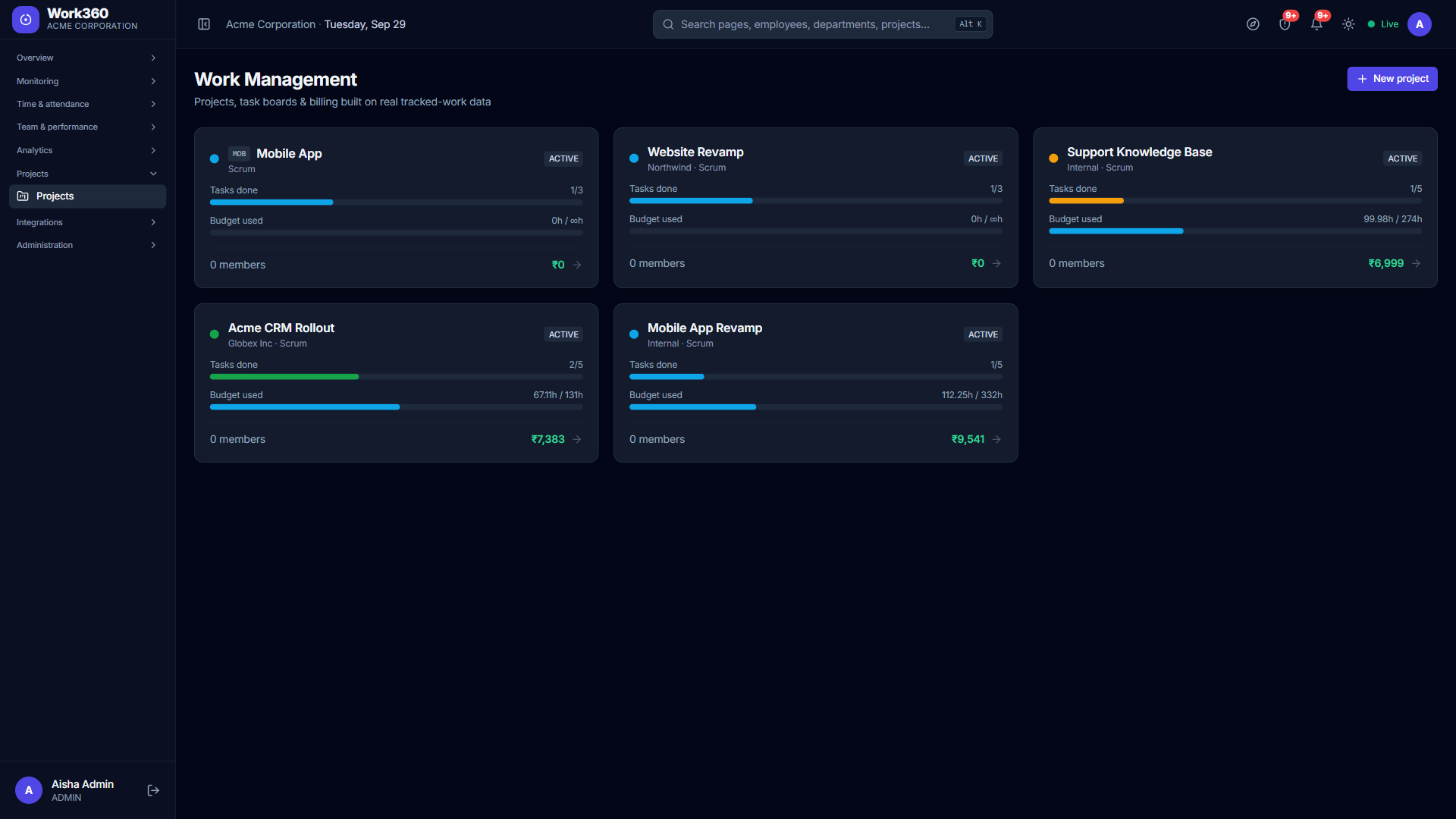
What Projects & Delivery does for you
Projects gives teams a place to plan and deliver work: projects with members and budgets, a Kanban board with priorities and configurable columns, and tasks that carry subtasks, checklists and attachments.
Because it lives next to time tracking, every task can run its own timer, and hours roll up into billable-versus-internal totals that feed straight into client invoicing — so delivery and billing finally agree.
- Projects with members & budgets
- Kanban board with priorities
- Drag-to-reorder tasks & subtasks
- Per-task & per-project timers
- Billable vs internal time rollups
- My Work & task notifications
- 12 tasks done this weekVelocity
- WIP limit reached: ReviewBoard
- 2 tasks overdueMobile app
Everything in Projects & Delivery
The building blocks of the module, and what each one gives you.
Kanban boards
Configurable columns, priorities and WIP limits.
- Drag-to-reorder
- Board filters & list view
- Custom columns
Tasks & subtasks
Break work down until it is obvious what is next.
- Subtasks & checklists
- Due dates & assignees
- My Work view
Built-in time tracking
Timers on every task and project.
- Per-task timers
- Project time rollups
- Linked to timesheets
Billing & invoicing
Turn billable hours into client invoices.
- Billable vs internal
- Generate & send invoices
- Track to paid
Collaboration
Keep the conversation on the work itself.
- @mentions
- Task notifications
- Activity history
Files & context
Everything about a task, in one place.
- Attachments
- Comments thread
- Budgets & members
Up and running in four steps
- 1
Create a project
Add members, a budget and your board columns.
- 2
Plan the work
Tasks, subtasks and checklists with owners and dates.
- 3
Track the time
Run timers as you work; hours roll up automatically.
- 4
Bill the client
Turn billable time into an invoice and track it to paid.
Feature deep-dives
Open any feature for the full detail, with real product screens.
Who uses Projects
See progress and blockers at a glance.
- Boards & WIP limits
- Overdue alerts
Know exactly what to work on next.
- My Work view
- Subtasks & checklists
Bill accurately from real hours.
- Billable rollups
- Client invoicing
Questions about Projects
Does it replace Jira or Trello?
For most teams, yes: Kanban boards, tasks, subtasks, checklists, attachments and @mentions cover day-to-day delivery, with time tracking built in.
How does time tracking connect?
Every task has a timer; hours roll up per project into billable and internal totals that feed timesheets and client invoices.
Can we invoice clients from it?
Yes — billable project hours turn into client invoices you can generate, send and track to paid.
Is Projects included with HRMS?
Projects is its own standard module, so you can licence it on its own or alongside any other module.
Explore other modules
Start with Projects, add the rest as you grow
Switch modules on per seat, in one workspace and one bill. No credit card to start.
Start your free trial