Assets & Licences
A hardware register with assignment history, cost, warranty and depreciation, plus software and SaaS licence tracking — with an exit clearance checklist.
- 14-day free trial
- No credit card
- One workspace, one bill
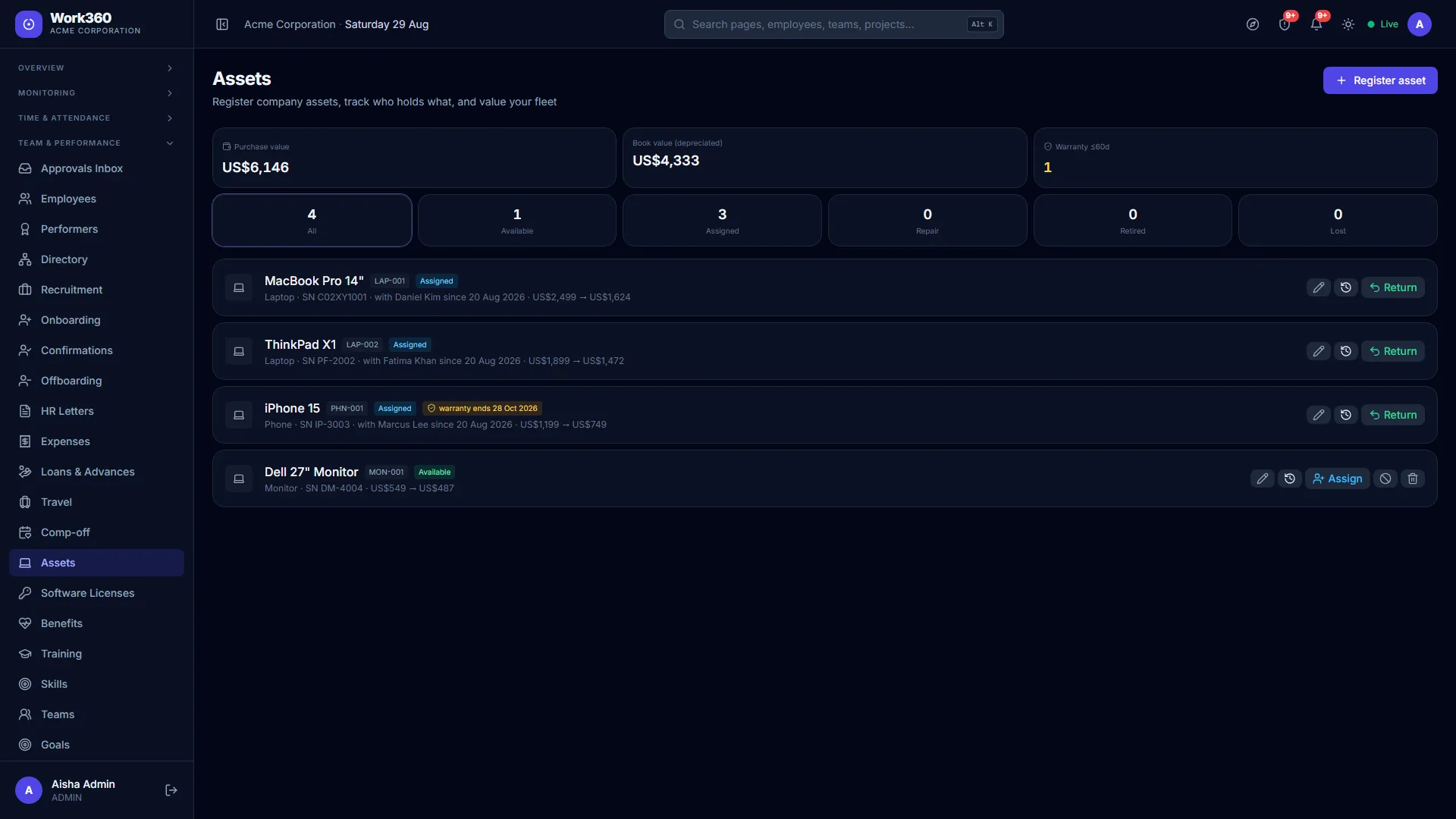
What Assets & Licences does for you
Assets & Licences keeps a living register of every laptop, monitor and paid seat. Machines running the Work360 agent become assets automatically — named by host, linked to their live status — so the register never falls behind reality.
Every assignment and return is recorded with a full holder history, cost, warranty and depreciation are tracked, and software and SaaS licences are counted against seats. When someone leaves, an exit clearance checklist makes sure everything comes back.
- Asset register & depreciation
- Assignment & return history
- Software / SaaS licence tracking
- Cost, warranty & renewals
- Exit clearance checklist
- 4 warranties expire this monthHardware
- Leaver clearance completeExit · today
- Licence seats over limitSaaS · 2 apps
Everything in Assets & Licences
The building blocks of the module, and what each one gives you.
Hardware register
Every device, with specs, cost and live agent status.
- Auto-created from agents
- Named by host
- Live online status
Assignment history
Who had what, and when — from issue to return.
- From / to holder trail
- Bulk assignment
- Return tracking
Cost & depreciation
Know what your fleet is worth today.
- Purchase cost
- Depreciation schedule
- Warranty expiry
Licence tracking
Software and SaaS seats, counted and enforced.
- Seat counts
- Renewal dates
- Spend overview
Exit clearance
Nothing walks out the door with a leaver.
- Clearance checklist
- Asset recovery
- Linked to offboarding
Reports & audits
An asset register you can hand to finance or an auditor.
- Export the register
- Filter by holder
- Audit-ready
Up and running in four steps
- 1
Build the register
Agent machines appear automatically; add the rest.
- 2
Assign to people
Issue devices and seats; every hand-off is logged.
- 3
Track the lifecycle
Cost, warranty, depreciation and renewals, tracked.
- 4
Clear on exit
A checklist recovers everything when someone leaves.
Feature deep-dives
Open any feature for the full detail, with real product screens.
Who uses Assets
Always know where every device is.
- Live register
- Assignment trail
Accurate asset value and licence spend.
- Depreciation
- Renewals & spend
Clean, complete offboarding every time.
- Exit clearance
- Asset recovery
Questions about Assets
Do we have to enter every laptop by hand?
No. Every machine running the Work360 agent becomes an asset automatically, named by host and linked to its live status.
Can it track software licences?
Yes — software and SaaS licences are tracked against seats, with renewal dates and spend.
What happens when an employee leaves?
An exit clearance checklist lists every asset assigned to them so nothing is missed, linked to the offboarding flow.
What if an agent is uninstalled?
The asset and its full history stay in the register; only the live device link is removed.
Explore other modules
Start with Assets, add the rest as you grow
Switch modules on per seat, in one workspace and one bill. No credit card to start.
Start your free trial